

DeploymentEditor is a visual, project-based software packaging editor that makes it much easier to build professional deployment packages with PSAppDeployToolkit (PSADT) v4.
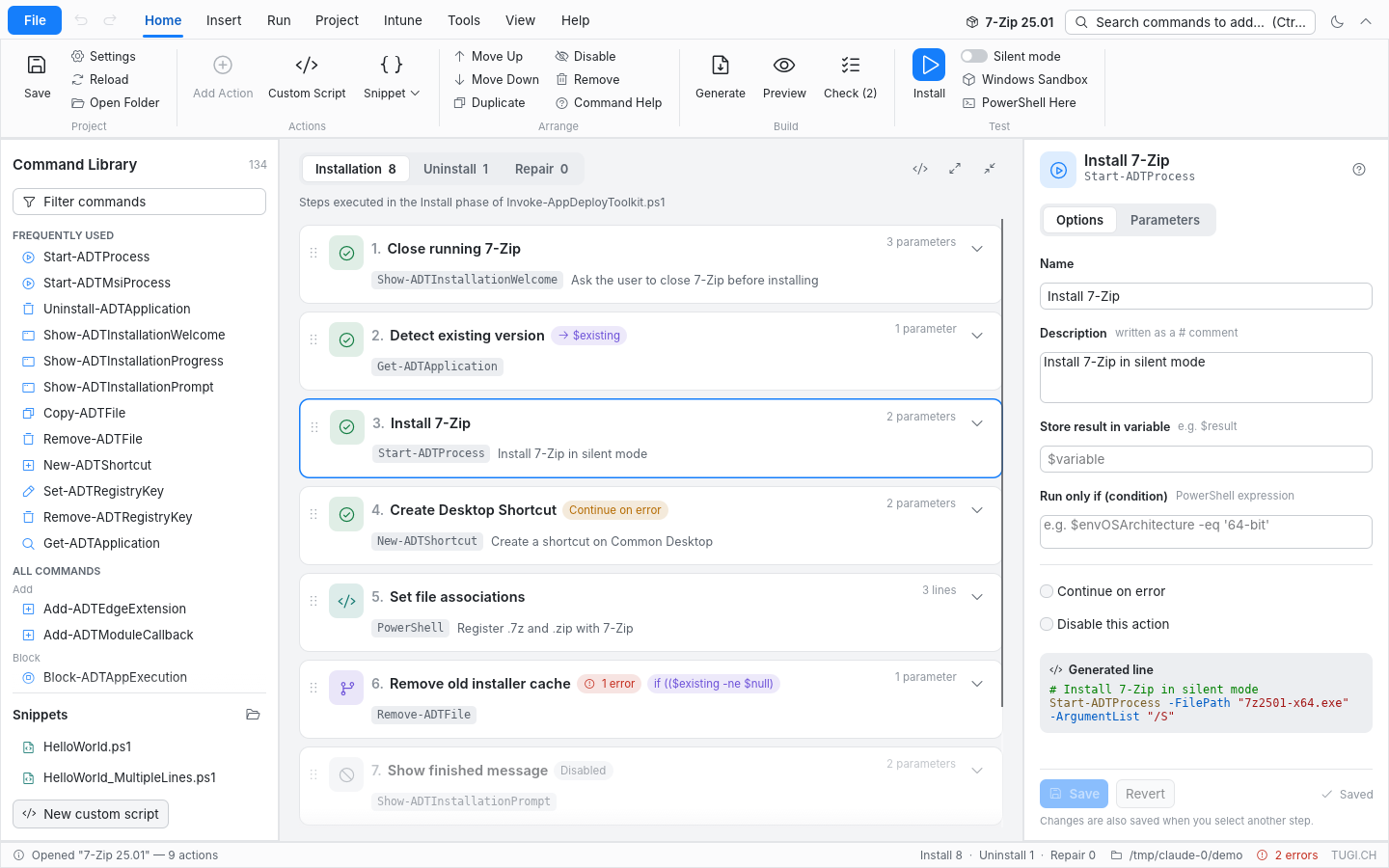
This is the Rust edition (v3): a complete rewrite of the original PureBasic DeploymentEditor (v2) with an Office-style ribbon UI. You build the install, uninstall and repair logic visually, and the editor generates a fully structured, production-ready Invoke-AppDeployToolkit.ps1 that follows PSADT best practices.
Key Benefits
- 🚀 Single portable
DeploymentEditor.exe: no .NET, no WebView2, no installation required - 🧩 Visual sequence editor: drag & drop steps, condition builder, live preview of the generated line
- ☁️ Native Intune upload: builds the
.intunewinand uploads the Win32 app through Microsoft Graph - 🖥 Run on Remote Machine: test a package on one or more computers via WinRM or as SYSTEM
- ✅ Quality check (F7) and undo / redo for every change
- 📄 PDF documentation of the installation procedure
- 🌗 Light and dark mode
- 🔁 Drop-in compatible with the PureBasic version: same project database, command catalog and templates
- 🔓 Free & Open Source: no licensing costs, no limitations
DeploymentEditor is ideal for:
- Endpoint Management Engineers (Intune, SCCM, MECM)
- Enterprise IT Administrators
- Software Packaging Specialists
- Anyone deploying Windows software at scale
🔄 Differences to the PureBasic Version
- Drop-in compatible: same project database (
Invoke-AppDeployToolkit.db), sameDatabases/PSADT.sqlitecommand catalog, sameTemplates,ThirdParty,Plugins,SnippetsandScriptsfolders. Projects can be opened in both versions. - The script generator is a faithful port of
BuildScript(): a unit test checks that the demo project produces byte-identical output. - WinGet import no longer downloads the whole winget-pkgs repository; it uses
winget searchand fetches only the selected installer manifest. Without the winget CLI you can type identifier + version. - The Monaco editor and the HTML log reader are replaced by native components, so the
Webfolder is no longer needed. - New: native Intune upload and packaging, detection rule editor, condition builder, quality check, undo / redo, PDF documentation.
- New: drag & drop reordering, duplicate action, quick-insert gallery, generated-line preview, dark mode, MSI uninstall step by ProductCode, MSI / PS1 file drops.
- New: Run on Remote Machine (not implemented in the original): PowerShell Remoting or a SYSTEM scheduled task, several computers at once, logs copied back.